1 Introduction
1.1 SDK
To facilitate the vast Unity 3D developers with creating Pico VR Headset applications, our company released PicoVRAndroidSDK_Unity (hereinafter referred to as the SDK). The SDK provides mainly the functionalities including sensor fusion, binocular stereo rendering, optical distortion correction, asynchronous time warping, single buffer rendering, 3DoF/6DoF multi interaction support, 3D stereo sound effect, power and cooling management, account and payment management etc.
For the convenience of integration, the SDK is provided in UnityPackage format and developers can find the following directory after import:
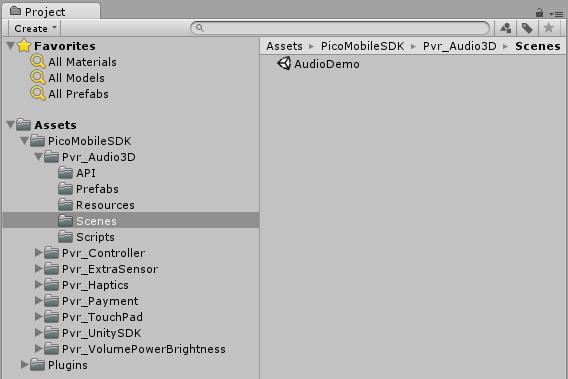
Figure1.1 SDK Structure
Every subdirectory under Assets> UnityMobileSDK corresponds to an SDK functionality and the Scenes directory under subdirectory provides scenarios for you to refer to and when you have problems during SDK integration, you can check out the documentation or refer to the methods in referential scenes.
1.2 Documentation
This document mainly introduces the SDK integration methods including integration of stereo rendering, sensor fusion and other features, usage of device controllers, integration of payment functionality. It also described the directory structure of the SDK and the functionalities of interface APIs and in addition, answered some frequently asked questions. Before using the SDK, it’s highly recommended to read this document for best results.